In a browser
Open the display link in a compatible modern browser. Check your intended media on the actual device: browser support, video formats, autoplay rules and performance vary.
 Cliora
Cliora is a digital signage platform developed by AI-Soft. Create content, connect your displays and manage what plays — from one browser-based workspace.
Currently free to use within the available service limits.
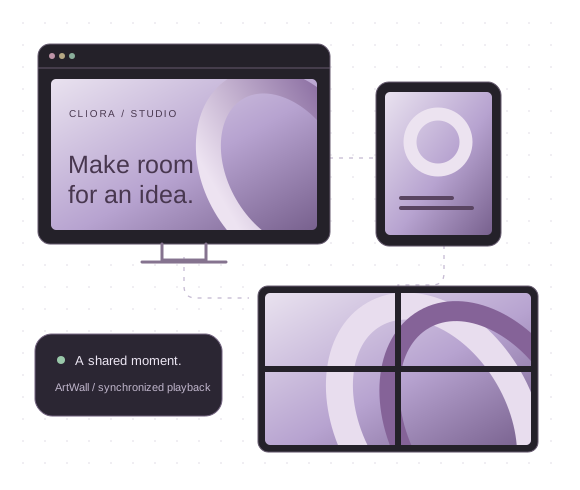
Digital signage puts changing visual content on screens: a menu, a welcome message, a product presentation. Cliora connects the work of making that content with the work of keeping it up to date.
Use the desktop visual editor to combine text, images, video, galleries, shapes and multiple pages. Adjust layouts, fonts, layers and interactions, or use the configured AI tools for a starting point.
Open a display link in a compatible browser, or install a dedicated player and pair it with a code or QR scan. Assign content or a display link to the device.
Change the assigned content centrally, organize contents, links and devices into folders, and check whether a paired device has recently checked in. Connected players pick up changes on their next check.
The mobile workspace lets you pair displays, switch their content or links, and handle day-to-day management. Keep detailed visual editing for your desktop browser.
Run the workspace on your own web hosting. A useful choice when you want to manage the installation and keep its files on infrastructure you control.
Get the portable workspaceThe portable package contains the Cliora workspace. Copy its files to your hosting, complete the initial administrator setup, then use the same browser-based interface.
The workspace runs on the server; the player runs at the screen. Player installers are separate and offered from cliora.eu by default. The public marketing pages are not part of the portable package.
See the hosting requirementsCliora is built around browser-based playback. You can often reuse a computer, tablet or a screen connected to a suitable player, without committing to one manufacturer's signage hardware.
Open the display link in a compatible modern browser. Check your intended media on the actual device: browser support, video formats, autoplay rules and performance vary.
Download an app for Android, Windows, macOS or Raspberry Pi ARM64. Pair it with the workspace and assign what it should play.
Find your playerChoose the correct build for your device. An iOS player and a Docker distribution are in preparation, not currently available downloads. Desktop player updates currently require manual installation; Android supports remote update delivery, subject to device permissions.
ArtWall · one canvas, individual display links
ArtWall brings multiple displays into one composition. Arrange their output areas on a shared canvas; each screen gets its own link and shows its part of the larger picture.
A common server time reference coordinates supported videos, galleries and changing text. It is useful for adjacent displays, a showroom installation or a reception wall that should feel like one experience.
Synchronization depends on the devices, browsers and connection. Browser-based coordination does not guarantee frame-perfect playback.
Create inside Cliora, or connect from an AI application you already use. These are two different connections, with different roles.
The editor's AI tools can generate text, propose a complete editable layout, or produce an image with a supported image model. Website branding assistance can help bring an existing visual identity into the content.
“Create a portrait welcome screen with a headline, opening hours and space for a photo.”
Review the result and refine the native objects in the editor. If you choose a generated image instead, it remains a single image rather than separate editable elements.
Configure a supported provider, model and credentials in settings. Availability depends on that provider; external AI usage may have its own charges.
Cliora can connect to compatible AI clients through MCP (Model Context Protocol). It gives an authorized assistant tools to work with the workspace, instead of only describing what you could do.
“Create a welcome screen for the reception, then assign it to the reception display.”
The tools can find, create and update content, manage display links, and assign content or links to paired devices. Generated layouts use Cliora's editable content format.
Clients such as Claude or ChatGPT need support for custom remote MCP connections. Availability depends on the client's plan and settings, and on the permissions you grant.
You stay in control: connections follow account and folder permissions and can be revoked in settings. Not every AI client supports this connection or every operation.
Open MCP settingsA café menu, a shop window, an office update, a reception welcome or a family information screen. The same content-and-display workflow can serve different spaces.
Have a specific need that Cliora does not cover? Tell AI-Soft what you are trying to achieve. Useful ideas and individual requests can be considered for the development roadmap, without a promise of delivery or a deadline.
Share an ideaCliora is currently free within the available service limits. If it is useful to you, you can help support its operation and development through Ko-fi.
Support is entirely optional. The button opens Cliora’s Ko-fi page.
Support on Ko-fiCliora is a digital signage platform developed by AI-Soft. It brings visual content creation, display links and central screen management together in a browser-based workspace.
Cliora is currently free to use within the available service limits. The hosted service depends on the server capacity available to support registered users. Account limits can vary; check your workspace for the limits that apply to you. Unlimited use or permanent free availability is not promised. External AI providers may charge for their services.
The portable download contains the Cliora workspace for your own PHP web hosting. Upload it, complete the initial setup and open it in a browser. It needs PHP 8.0 or newer with the required extensions, HTTPS and writable storage; no database is required. Player installers are separate and are offered from cliora.eu by default. The public marketing website is not included.
Display links work in compatible modern browsers. Dedicated player downloads are available for Android, Windows, macOS and Raspberry Pi ARM64. A connected computer can drive a monitor or TV. Media formats, autoplay, browser capabilities and device performance still matter: try your actual content on the intended screen. An iOS player is not published yet.
Yes. ArtWall arranges multiple display areas on one shared canvas and gives each output its own link. Playback uses a shared server time reference for supported media, galleries and changing text. Results depend on the devices, browsers and network; this is not a guarantee of frame-perfect playback.
Yes. With a supported AI provider and model configured, the editor can generate text, propose a complete editable layout, or create an image using an image-capable model. The editor also offers website branding assistance. Review generated content before using it; a generated image is one image, not a collection of editable objects.
Cliora provides an MCP (Model Context Protocol) server for compatible AI clients, including clients that support custom remote MCP connections. Authorized tools can find, create and update content, manage display links, and assign content or links to paired devices. Client support, account features and granted permissions determine what is available. It does not automatically work with every AI service.
Yes. The mobile workspace supports useful day-to-day actions such as pairing devices with a code or QR scan, changing assigned content or links, and checking device status. Use a desktop browser for the visual content editor.
Send your feature ideas and use cases to info@cliora.eu. Useful requests can be considered for the development roadmap; acceptance and delivery dates are not guaranteed. You can also support Cliora through its Ko-fi page. Support is entirely optional.
Open Cliora, or take the portable workspace to your own hosting. Your next display can begin with the hardware you already have.
Developed by AI-Soft. Currently free within available service limits. Terms & privacy.